

/home, Cal Video transcription or AI notes, and other
Cal.com features that check whether AI is allowed for the organization are turned off too.
Only people who can edit the organization’s settings see the switch. Members without that permission
can’t change it.
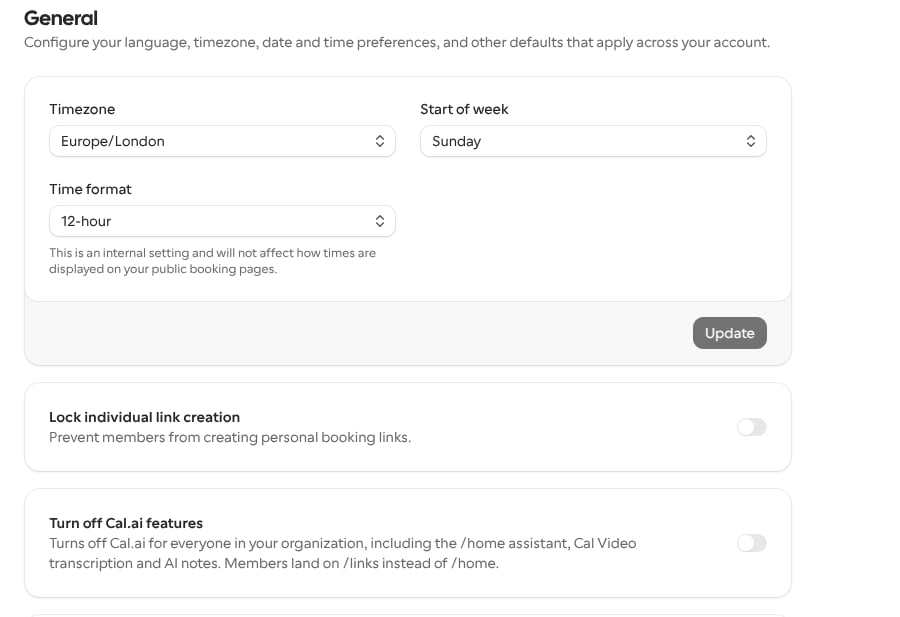
Turn off Cal.ai features
1
Open the organization's general settings
Go to Settings, then under your organization select General.
2
Turn on the switch
Turn on Turn off Cal.ai features. The change saves straight away.
What members see
When Cal.ai features are off for the organization:- The assistant is removed from the navigation, the command menu and the dock.
- Opening
/homeredirects to/links. - After signing in or finishing organization onboarding, members land on
/linksinstead of/home. - Cal Video transcription and AI notes are turned off.
- Standalone Cal Video rooms (personal, ad hoc and team rooms not tied to a booking) don’t offer live captions or transcription. A team room follows its team’s organization, and any other room follows the organization of the user who owns it. If that user belongs to more than one organization, captions are off when any of them has turned off Cal.ai, whichever organization’s address the room uses. The call itself still goes ahead, and a host can still stop captions that were already running.
- Cal.ai calendar agent requests made through
@calevent titles are refused before reaching an AI model. The event description explains that AI features are turned off for the organization.
Turn Cal.ai features back on
Turn off Turn off Cal.ai features in the organization’s general settings. The organization no longer blocks Cal.ai features and/home works again.